
How to Manually Add Leads With Your Pitch59 App

-
Open the Menu above your PitchCard.
- Tap Leads
- Choose the method to add your lead.
- Scan a Business Card
- Enter details manually
How to Enter Leads Manually
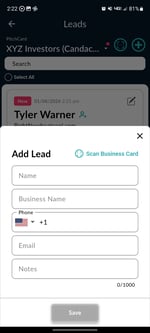
- Click the + button
- Fill out the form:
- Name
- Business Name
- Phone Number
- Notes (where you met, referral source, etc)
- Tap Save
A follow up reminder will automatically be scheduled for 9:00 AM the day after you created the lead. You can turn off the reminder or schedule the reminder for another day and/or time.